In today’s cloud-first world, identity is the new perimeter. Most security incidents no longer begin with network breaches — they start with compromised credentials.
During security assessments, one issue we repeatedly see across organizations is over-provisioned administrative access. It usually starts with a simple need — someone requires elevated permissions to complete a task. The access is granted; the task is completed… but the permissions remain.
Over time, this leads to too many standing administrators, especially Global Administrators, which significantly increases risk.
Microsoft recommends keeping the number of Global Administrators to a minimum. Yet in practice, many environments exceed this without realizing the long-term impact.
This is where Microsoft Entra Privileged Identity Management (PIM)becomes essential.
What Is Privileged Identity Management (PIM)?
Privileged Identity Management (PIM) is a capability within Microsoft Entra IDthat helps organizations manage and control administrative access.
Instead of giving users permanent elevated permissions, PIM allows access to be:
- Granted only when needed
- Approved if required
- Automatically removed after a defined time
This approach enforces the principle of least privilegeand reduces the risk associated with always-on admin access.
Why Privileged Access Needs Strong Control
Privileged accounts are one of the most attractive targets for attackers. If compromised, they can provide full control over your environment.
Some of the risks associated with unmanaged access include:
- Unauthorized access to sensitive data
- Accidental or intentional configuration changes
- Greater impact during account compromise
- Compliance and audit failures
The challenge isn’t just limiting access — it’s doing so in a way that doesn’t slow down IT teams. PIM solves this by introducing control without friction.
Key Features of Microsoft Entra PIM
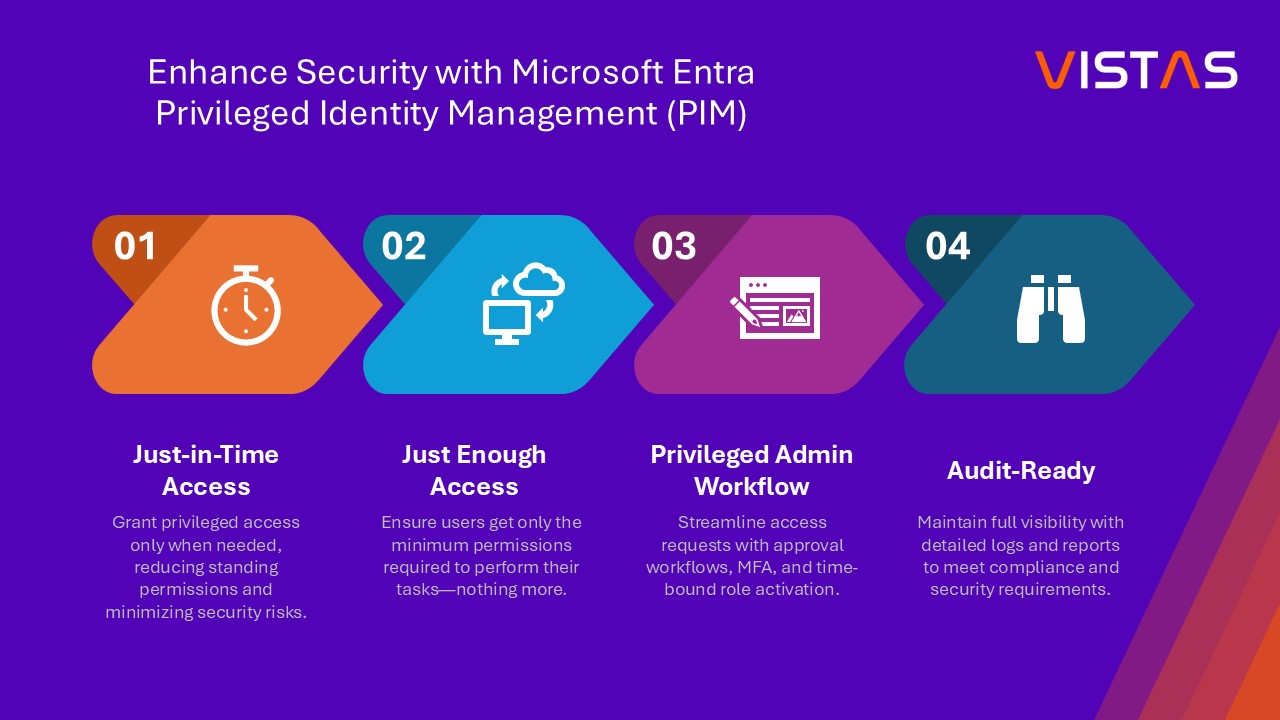
1. Just-in-Time (JIT) Access
Users don’t have permanent admin rights. They activate roles only when required, reducing exposure.
2. Time-Limited Access
Every activation has a defined duration, ensuring access is automatically removed.
3. Approval-Based Activation
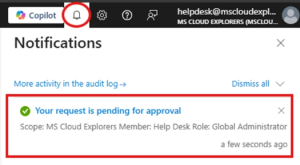
Critical roles such as Global Administrator can require approval before they are activated.
4. Multi-Factor Authentication (MFA)
Additional security verification is enforced during role activation.
5. Access Reviews
Organizations can regularly review and validate who still needs access.
6. Audit and Visibility
Every activation, request, and change is logged for visibility and compliance.
Licensing Requirement
To use Privileged Identity Management, organizations need:
- Microsoft Entra ID P2 license
Important note: You do not need to license every user—only those who will:
- Activate privileged roles
- Manage or configure PIM
Best Practices for Using PIM
From real-world deployments, these practices consistently deliver the best results:
- Use eligible assignments instead of permanent access
- Require MFA for all role activations
- Enable approval for high-privilege roles
- Keep activation durations short and task-based
- Conduct regular access reviews
- Monitor audit logs for unusual activity
- Use security or Microsoft 365 groupsto simplify role management
A Practical Role Governance Approach
Not all roles should be treated the same. A simple model can help:
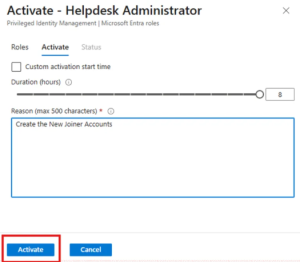
Low-Impact Roles
Examples: Helpdesk Admin, User Admin
- Activation: Self-service
- Requirement: Justification
- Duration: Short (e.g., a few hours)
High-Impact Roles
Examples: Global Admin, SharePoint Admin
- Activation: Requires approval
- Requirement: Justification + approval
- Duration: Strictly limited
This ensures the right level of control without slowing down everyday operations.
How PIM Works (Simplified)
Here’s what a typical workflow looks like:
- User is assigned as “Eligible”for a role
- When needed, the user requests activation
- Depending on configuration:
- Access is granted instantly, or
- Sent for approval
4. Once approved, the role becomes active for a limited time
5. After expiry, access is automatically removed This eliminates the need for manual cleanup and reduces human error.
Business Benefits of Implementing PIM
Organizations that implement PIM effectively see clear improvements:
Stronger Security
Reduced attack surface by eliminating permanent admin access
Better Compliance
Supports regulatory requirements with audit trails and access reviews
Improved Efficiency
Automated workflows reduce dependency on manual access management
Better Visibility
Full insight into who has access, when, and why
How VISTAS Cloud Can Help
Implementing Privileged Identity Management is not just about switching on a feature—it requires thoughtful design.
At VISTAS Cloud, we work with organizations to make identity security practical, manageable, and effective.
We can help you:
- Review your current environment and identify privileged access risks
- Reduce unnecessary Global Administrator assignments
- Design and implement a tailored PIM strategy
- Configure approval workflows, MFA, and Conditional Access
- Set up access reviews and governance processes
- Prepare your environment for audits and compliance
Whether you’re just getting started or improving an existing setup, we ensure PIM is implemented the right way.
Why Choose VISTAS Cloud
We focus on solutions that work in real environments — not just on paper.
Our approach is:
- Practical and easy to manage
- Aligned with your business needs
- Designed to minimize disruption
- Built on real implementation experience
We understand the common gaps organizations face — and how to fix them efficiently.
Final Thoughts
Managing privileged access is no longer optional — it’s a critical part of modern security.
Leaving administrative permissions permanently assigned creates avoidable risk. With PIM, you gain control without adding unnecessary complexity.
It’s a simple shift:
- From permanent access → to controlled access
- From manual tracking → to automated governance
- From risk exposure → to proactive security
When implemented correctly, it makes a noticeable difference in both security and operations.
Get Started with VISTAS Cloud
If you’re unsure about your current setup or planning to implement PIM, we’re here to help.
Reach out to VISTAS Cloud for a consultation or security assessment.
Let’s help you build a more secure, controlled, and compliant Microsoft environment — without slowing your team down.
About the Author:
Pankaj is a Microsoft 365 Support Engineer at VISTAS Cloud, specializing in security, tenant management, and cloud solutions.