When managing Microsoft 365 environments, ensuring secure emergency access is critical. Breakglass accounts serve as dedicated administrative accounts that allow organizations to regain access during lockouts caused by misconfigurations, credential issues, or security policies.
Recent real-world scenarios have shown how misconfigured Conditional Access policies—such as applying restrictions to all users without exclusions—can unintentionally lock administrators out of their own tenant. In some cases, enforcing strict MFA policies like phishing-resistant authentication across all users without proper device compliance led to complete access loss.
These incidents highlight the importance of properly configuring and maintaining breakglass accounts. Microsoft now recommends excluding these emergency accounts from Conditional Access policies to prevent such situations.
In this blog, we explore the importance of breakglass accounts, how to implement them correctly, and best practices to ensure secure and reliable access when it matters most.
What is Microsoft Breakglass account
Breakglass accounts in Microsoft 365are emergency administrative accounts designed to ensure access during critical situations, such as security breaches or when standard admin accounts are locked or unavailable.
These accounts have elevated privileges and are intended to be used only in rare scenarios to regain control of the environment. They play a vital role in minimizing downtime and ensuring business continuity by providing access to key services like Azure AD, Exchange, and SharePoint when it matters most.
Step 1: Create the Breakglass Account
- Create a dedicated account with a non-obvious username (avoid names like admin or emergency).
- Use a structured naming format such as: BGA_EMC_<domain>@<tenant>.onmicrosoft.com
- Always use the default Microsoft fallback domain.
- Assign Global Administrator(and Privileged Role Administrator if required).
- Set a strong password(minimum 32 characters).
Step 2: Configure Access & Authentication
Microsoft now recommends using passwordless, phishing-resistant authentication methods for breakglass accounts to meet strong security requirements while maintaining emergency access.
- Configure one of the following authentication methods:
- Passkey (FIDO2) – Recommended
- Certificate-Based Authentication (CBA) (if your organization has a PKI infrastructure)
- Enable and register FIDO2 passkeys for the account where applicable
- Alternatively, configure certificate-based authentication for secure access
- Ensure all emergency accounts meet phishing-resistant MFA requirements
Additionally:
- Exclude the breakglass account from standard Conditional Access policies that could block access
- Ensure Security Defaults are disabled if Conditional Access is being used
- Avoid configurations that may prevent login during emergency scenarios
Step 3: Secure Credential Storage
Store credentials securely using a trusted password manager or offline secure storage. Access should be restricted to authorized personnel only.
Step 4: Restrict Usage
Breakglass accounts should never be used for daily administration. They must remain inactive and only be used during emergencies. Enable audit logging and alertsto monitor any usage.
Step 5: Configure Login Alerts
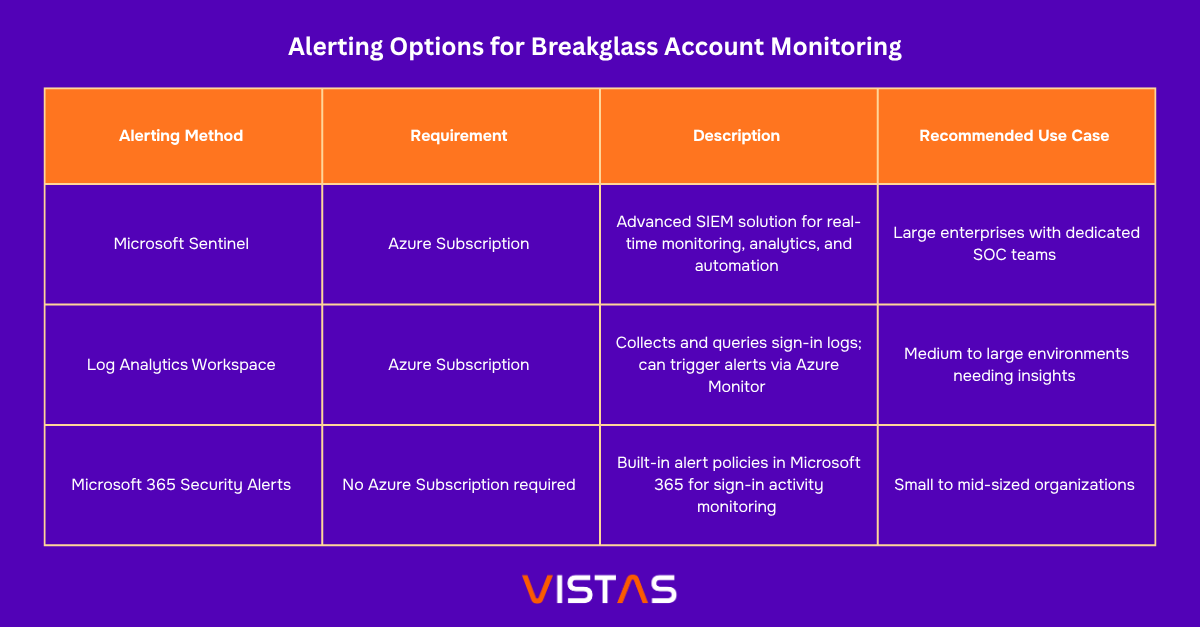
Monitoring is critical. Set up alerts for every sign-in attempt:
- If Azure is available, use Log Analytics / Microsoft Sentinel
- Alternatively, configure alerts using PowerShell-based methodswithout requiring additional Azure costs
Microsoft 365 Step 6: Validate Alert Configuration
Verify alert policies in:
Security → Email & Collaboration → Policies & Rules → Alert Policy
Ensure notifications are correctly configured and sent to appropriate recipients.
Step 7: Test the Setup
Perform controlled testing to ensure:
- The configured passwordless authentication method(FIDO2 passkey or certificate-based authentication) works as expected
- No unexpected prompts or policy restrictions block access during login
- Alerts are triggered for every sign-in attempt
Ensure alert notifications are properly configured and monitored by the appropriate security team for visibility and response.
Best Practices for Managing Breakglass Accounts
- Limit Access:Only a small group of trusted administrators should have access to credentials
- Regular Testing:Periodically validate account functionality and alerting mechanisms
- Enable Monitoring:Ensure all activity is logged and alerts are actively monitored
- Separate Usage:Never use breakglass accounts for routine administrative tasks
At VISTAS Cloud, we help organizations implement secure, compliant, and resilient Microsoft 365 environments. Properly configured breakglass accounts are a critical component of any strong identity and access management strategy.
About the Author:Pankaj is a Microsoft 365 Support Engineer at VISTAS Cloud, specializing in security, tenant management, and cloud solutions.